

Part 1: The Accidental Toolkit
By Olu • April 2026
I’m tired of seeing customer service tickets used to explain agentic AI. Not because it’s wrong; it’s just not the only story. So I want to share a different one, from building an animation production platform, that shows how we moved from human-dependent workflows to autonomous agents. Not because we planned to, but because we paid attention to what the work was teaching us.
This is going to sound like we knew what we were doing from the start. We didn’t. Everything I’m about to describe came from experimenting, hitting walls, solving immediate problems, and only later recognizing the pattern. I think that’s actually how most real agentic breakthroughs happen.
The Problem: 75% Isn’t Production-Ready
Page2Play turns written stories into coherent, production-ready video stories. The AI generates frames for each scene; characters, environments, compositions. And most of the time, it gets close. But “close” isn’t good enough for production work.


The problems are subtle. A character’s scarf shifts from burnt orange to rust. A face gains an extra line that wasn’t in the original character lineup. The overall pose and composition might be right, but the details drift. Across a full storyboard of dozens of frames, these small deviations compound into something that looks inconsistent and unprofessional.
We measured this by having me and my team manually review every frame generated. We’d look at each one, compare it against the character lineup and story context, and decide: does this pass or need corrections? About 75% of frames passed without needing changes. That last 25%; the gap between “AI-generated” and “production-ready”; required manual intervention.
For indie creators paying for professional video, we couldn’t ship 75%. We needed closer to perfect. And closing that gap was entirely manual work.
First Attempt: Human Review Doesn’t Scale
The first solution was straightforward: human review. Someone looks at each frame that fails the initial check, identifies what’s off, and makes corrections. Then the frame gets regenerated.
The problem was that making those corrections was technical. It involved prompt engineering, image manipulation, and parameter adjustments that required understanding how the underlying generation models work. For a skilled operator like me or my team, it was manageable. For most users of the platform, it was a wall they couldn’t climb.
The output quality was good when a knowledgeable person did the review. But it didn’t scale. You can’t build a production platform around the assumption that every user is also an AI prompt engineer. And we couldn’t manually review every frame for every user; we were discovering through early feedback that the real opportunity was B2B partnerships where turnaround time and volume would be critical.
We needed a different approach.
Second Attempt: Simplifying for Humans
So we asked a different question: what if the user didn’t need to write prompts at all?
We built a set of visual UI controls that map to the underlying parameters. Instead of writing complex prompts, users could make corrections through simple, structured interfaces. We designed four distinct editing methods, each handling a different type of correction:
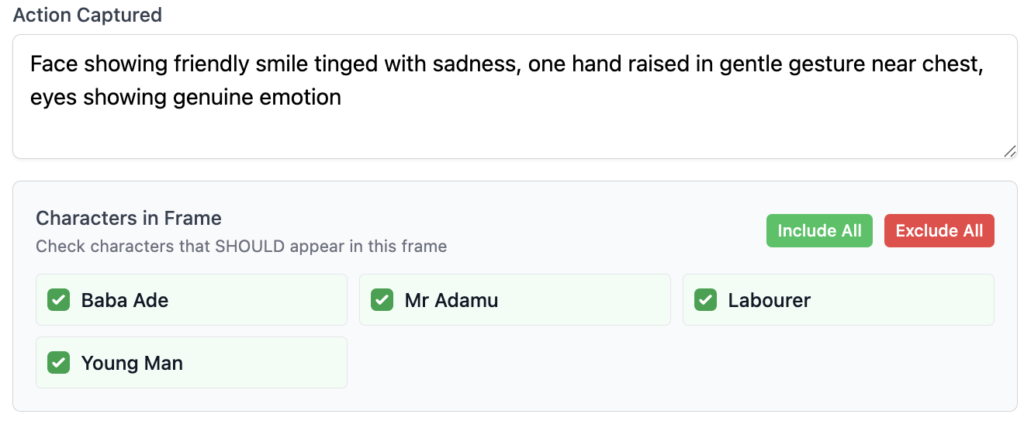
1. Character Include/Exclude A simple checkbox system. Want a character in the scene? Check the box next to their name. Want them out? Uncheck it. Regenerate, and the character appears or disappears. This gives users complete control over who is or isn’t in each frame without writing a single prompt.
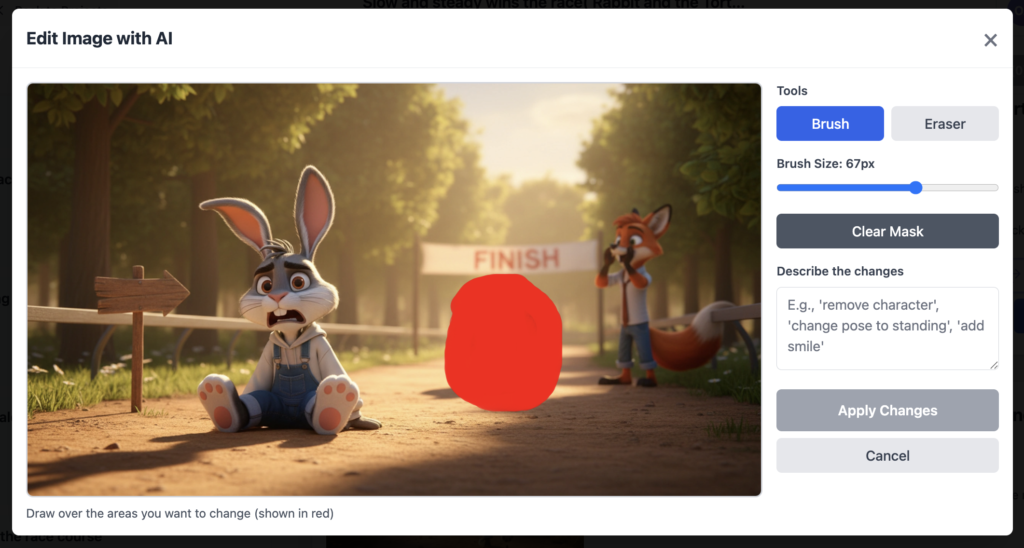
2. Inpainting (Precision Editing) Users can highlight a specific character or object in a frame and adjust or remove just that area. The edit affects only the highlighted region, leaving the rest of the image untouched. Perfect for fixing one element without regenerating the entire frame.
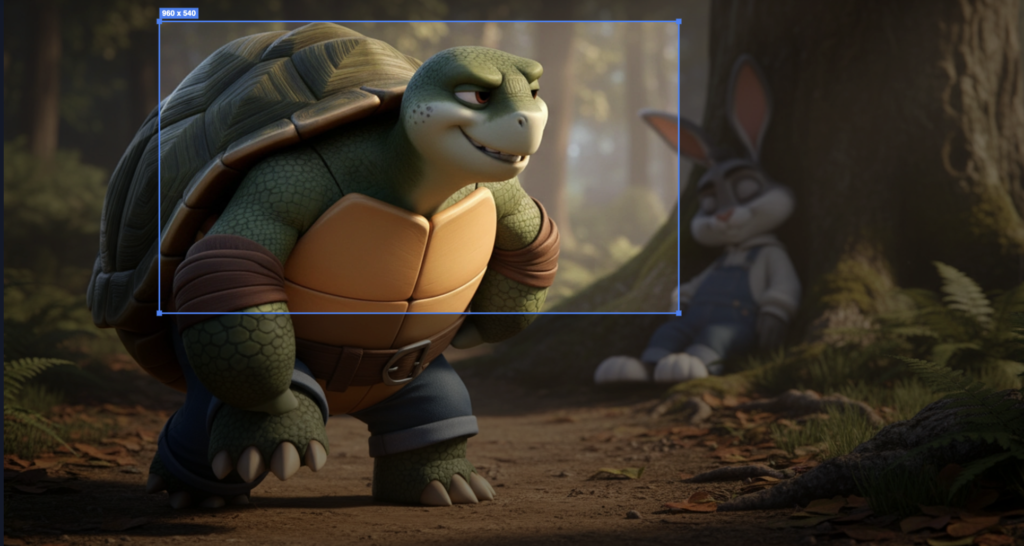
3. Crop and Upscale Users can crop to focus on a particular section of a frame; zoom in on a character’s face, isolate an important object; and the system upscales that cropped area while maintaining the original aspect ratio and quality.
4. Name Reference Instead of describing characters with phrases like “the man in the grey shirt” (which often causes the model to generate a new character), users reference characters by their actual names. When the prompt says “Olu” instead of “the character,” the model knows exactly who you’re talking about and maintains consistency with the character lineup.
This was a UX success. Over the next 8-12 weeks, we iterated and evolved these features based on user feedback. Users who had no technical background could now review and correct frames. The quality gap started closing. The human-in-the-loop process actually worked at scale.
But here’s the thing I didn’t see coming.
The Breakthrough: We’d Accidentally Built an Agent Toolkit
By simplifying the correction process for humans; by turning complex prompt engineering into structured, discrete controls; we had simultaneously defined the exact action space an AI agent would need to do the same work.
Think about what we’d built: a finite set of adjustment parameters, each with clear inputs and predictable outputs. A human could look at a frame, decide what was wrong, and use these controls to fix it. But that sequence; assess, decide, adjust, regenerate; is exactly what an agent does. The tools we designed for human ease became the tools the agent would operate.
We didn’t design an agent toolkit. We discovered one.
Coming in Part 2
What we didn’t expect: the agent didn’t just match human performance. It exceeded it; in ways we didn’t want.
In Part 2, I’ll show you exactly how we built the agent in three weeks, the unexpected problem nobody warns you about (teaching an AI “taste”), the results we achieved (75% → 95-98%), and the pattern that might already be hiding in your own product.
[Read Part 2: Building the Agent (And Teaching It Taste) →]
Olu is the founder of Page2Play, an AI-powered platform that turns written scripts into production-ready videos.